Media & Backup Server
Having a backup of all the data is important at both consumer and enterprise level. At the moment the only source I had to backup my data and share it is the free 15GB of storage in Google Drive. As a system administrator never do that. That’s why I’m following the simple 3-2-1 strategy.

In my case, the primary data sources are the MasterPC, my family PCs and all of our Android devices.
The types of storage and drives that I’m going to use as storage are the MasterServer HDDs, and only the most important data in Google Drive. As a secondary data source I will rely on DVDs for now until I find a better backup media.
I’ve been asked lots of times by family, friends, companions and even teachers to recover their data and having to make a backup since I had to reinstall their OS or change their storage hardware.
Most of the times, just like HDDs, we have our data fragmented or spread in a lot of devices because one is not enough to backup all the data (e.g. I cant save the content of 2 4TB HDDs of used storage in the MasterPC to a single USB drive or Google Drive).
Having to save files at the working place to use them later at home is a daily basis for any worker or student. Also having to share large files or documents with other people. Most messaging programs or websites have a size limit.
Architecture
The final solution to those needs is a NAS [1] integrated in the cloud.
The most important fact was deciding where and how to install it. Usually a NAS is a separate device connected to the network with the only purpose of serving storage.
The cheapest NAS device I’ve seen in the market is at least 100$, like the Synology diskstation ds120j. It comes with a single HDD bay (HDD not included), a dual core 800 MHz CPU and 512 MB RAM.
Since I’m not spending 100$ on a weak and not upgradeable hardware, I’m going to run it in a CentOS container.
The first option I thought about was installing OpenMediaVault in a container with a workaround to get it to work as a service but it didn’t work due to the unprivileged container perms.
Also it’s was not possible to mount a CIFS resource in an unprivileged container due to fstab limitations. The only way to do it would be mounting the CIFS resource in the Proxmox host and then pass it to a container as a mount point but I considered that as a big dependency on the host OS that I didn’t want.

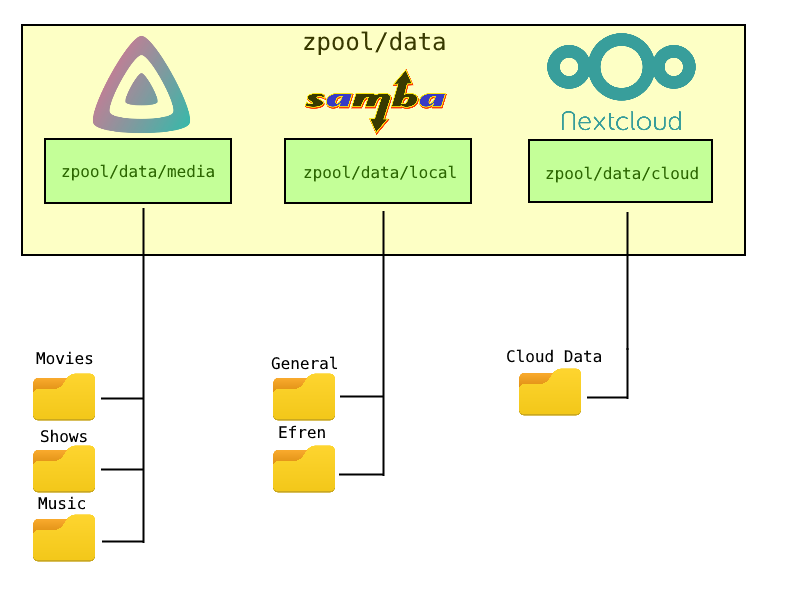
The main media and backup server final architecture and datasets look like this.
Footnotes
| [1] | Network Attached Storage |